
SoKal Is Now a Calendar You Can Live In
Why SoKal grew up
I built SoKal after going home for my college homecoming. The night I was leaving, I found out from Instagram stories that friends of mine had been in town the whole weekend. We just never knew.
So SoKal started as a shared calendar for friends: see when people are around, see who's free, make plans. People liked that part. But I kept hearing the same thing: "I still need my regular calendar for everything else."
That's the problem. If SoKal is your second calendar, you forget to check it. Plans with friends live in one app, your dentist and your meetings live in another, and nothing lines up.
So for the last few months I've been closing that gap. The goal is simple: SoKal should be the only calendar you need, with your friends built in.
What's new
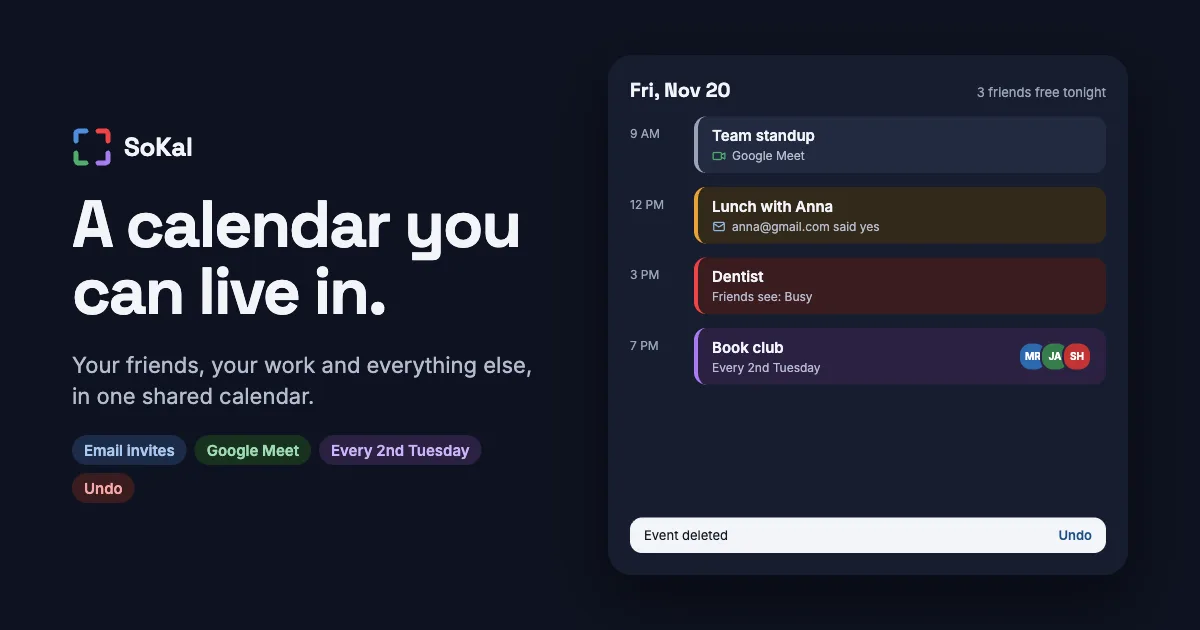
Invite anyone, even if they're not on SoKal. Type an email address and they get a normal calendar invite in Gmail or Outlook, with Yes, Maybe and No buttons. Their answer shows up in SoKal. Change the time and their calendar updates. Cancel and it disappears.
Google Meet in one tap. Add a Meet link when you create an event. Everyone on the event gets the same room.
Your plans in your work calendar. Turn on your calendar feed and subscribe to it from Outlook or Google at work. Show full details, or just "Busy" so coworkers stop booking over your Friday dinner.
Repeats that match real life. Every 2nd Tuesday. The last Friday of the month. The 4th Thursday in November. They sync to Google, Outlook and Apple Calendar the right way.
The basics you expect. Undo after you delete or edit something. Search across your calendar. Drag events to move them on the web and Mac. Color each calendar. Warnings when something overlaps. Keyboard shortcuts.
Works with Claude. Ask Claude to plan a beach day with five friends, add a Meet, or invite someone by email. It all lands in SoKal, and in your Apple Calendar too.
What didn't change
Your friends still see only what you choose. You decide which kinds of plans each group of friends can see, and everything else shows as busy or doesn't show at all. Adding your work calendar to SoKal doesn't hand your meetings to your friends.
And SoKal is still free. Every feature, on iPhone, iPad, Android, Mac and the web.
What's next
A booking page is coming. Turn it on, set the hours you're open, and share a link. Clients and coworkers pick a time that's actually free, based on everything already on your calendar, and they only ever see open times.
Try it
SoKal is free on the App Store, Google Play and at sokal.app. If you use Claude, add the SoKal connector from Claude's connector directory and plan with your friends in plain words.
If you've been keeping one calendar for friends and another for everything else, I'd love for you to try running your week in SoKal and tell me what's missing.



James