
7 Best Family Calendar Apps (2026)
The short version. For a household that runs on lists and meal plans: Cozi or FamilyWall. If every device in the house is Apple: Apple Calendar. If you want your family to see your real calendar while your friends and coworkers still see only what you choose: SoKal.
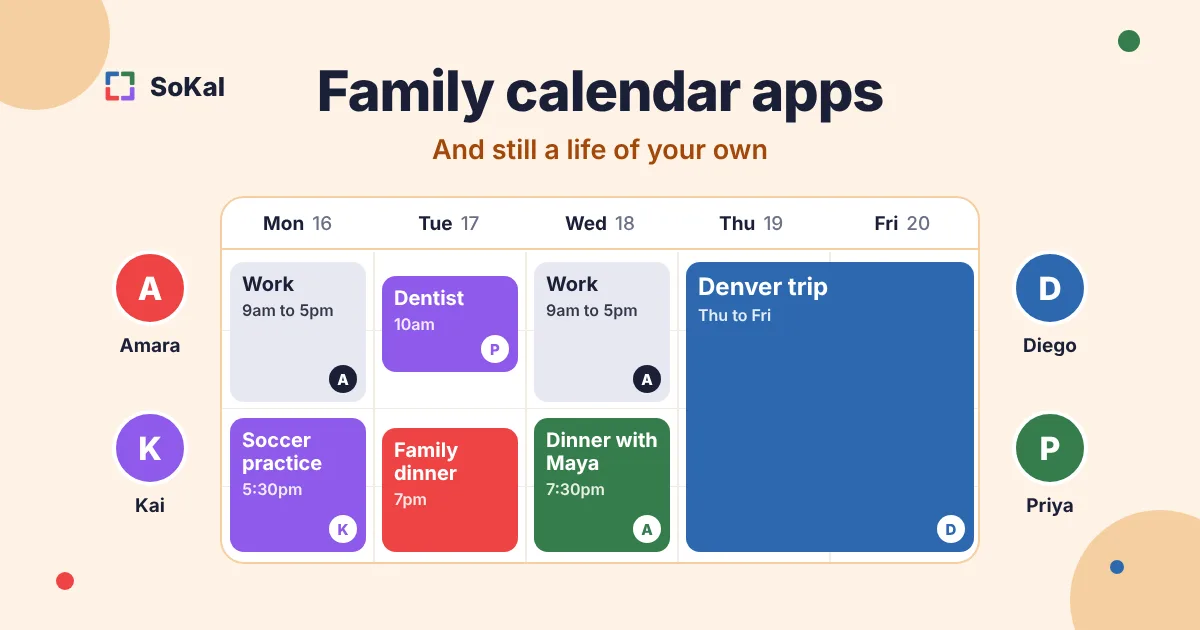
Most family calendar apps work the same way. The family gets one calendar, everyone writes into it, and everyone sees all of it. That's great for soccer practice and dentist appointments.
The trouble is the rest of your life. Your work meetings, your trips and your dinners with friends live in another calendar, so your family never sees them. Or you copy them over by hand, and now you keep two calendars. One of them goes stale, and it's usually the family one.
So this list sorts the apps by one question: is the family calendar a separate place, or is it part of the calendar you already live in?
One note first. SoKal is our app. I'm James, and I build it. It's on this list for one job, and several apps here beat it at theirs. Each section says so.
Family calendar apps at a glance
Prices are from the US App Store in November 2026, except Cozi's, which is from cozi.com. On a phone, scroll the table sideways.
| App | Best for | How it works | Platforms | Price |
|---|---|---|---|---|
| SoKal | A family calendar that's also your own calendar | Everyone keeps their own calendar and chooses what family and friends see | iPhone, iPad, Android, Mac, Windows (Microsoft Store), Web | Free, no ads |
| Cozi | Families with kids and a lot of logistics | One family account that everyone signs in to | iPhone, iPad, Android, Web | Free with ads; Gold $39/year |
| FamilyWall | Families who want lists, messages and a locator in one app | A private family space with a shared calendar | iPhone, iPad, Android, Web | Free; Premium $44.99/year |
| TimeTree | Families who talk through every plan | One shared calendar per group, with a chat on each event | iPhone, Android, Web | Free with ads; Premium $4.49/month |
| FamCal | A simple shared calendar with lists and memos | One family account with a shared password | iPhone, iPad, Android, Web | Free; paid subscription for extras |
| Apple Calendar | Households where every device is Apple | Family Sharing adds a Family calendar for everyone | iPhone, iPad, Mac, Windows (iCloud for Windows), Web (via iCloud.com) | Free with an Apple device |
| Google Calendar | Families already on Google | A Google family group gets a calendar called Family | iPhone, iPad, Android, Web | Free with a Google account |
The two kinds of family calendar
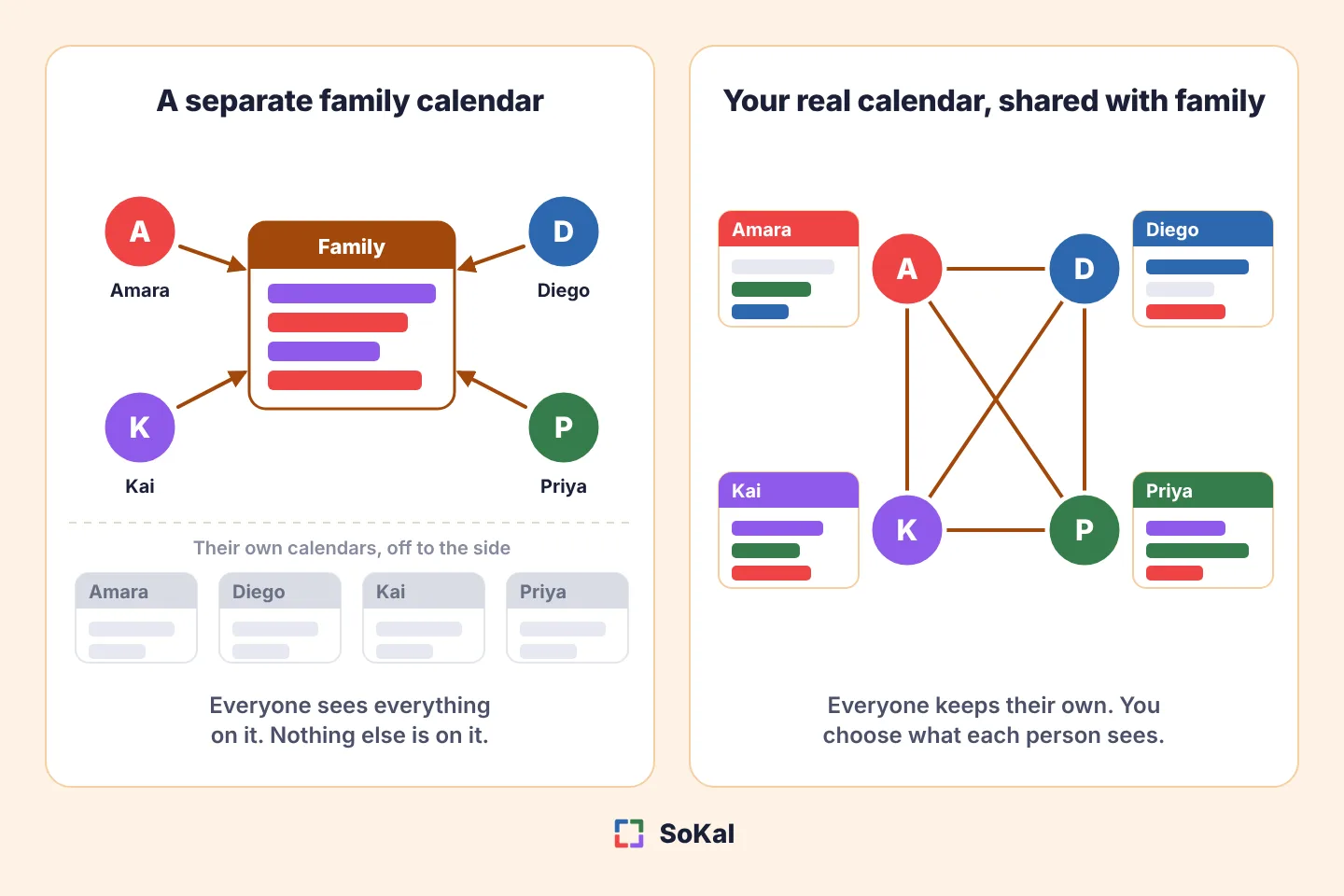
A separate family calendar. Cozi, FamilyWall, TimeTree and FamCal work this way, and so do the Family calendars in Apple and Google. There's one calendar for the household. Everything on it is visible to everyone in the family, and nothing else in your life is on it unless you put it there.
Your real calendar, shared with family. SoKal works this way. Each person keeps their own calendar, and the family sees it next to theirs. You choose how much each group of people sees.
Neither is wrong. A separate calendar is simple, and it's the right shape for young kids who don't have a calendar of their own. A shared real calendar fits better once the family is made of people with jobs, friends and trips, like two working parents, teenagers, or grown kids and their parents.
1. SoKal: a family calendar where you still have your own life
Best for: families who want to see each other's real schedules without giving up their own calendars.
- iPhone available
- iPad available
- Android available
- Mac available
- Windows (Microsoft Store) available
- Web available
SoKal is a full calendar with sharing built in. It syncs both ways with Google Calendar, Outlook and Apple Calendar, so the late meeting, the work trip and the dentist are already there. Nobody copies anything into a second calendar.
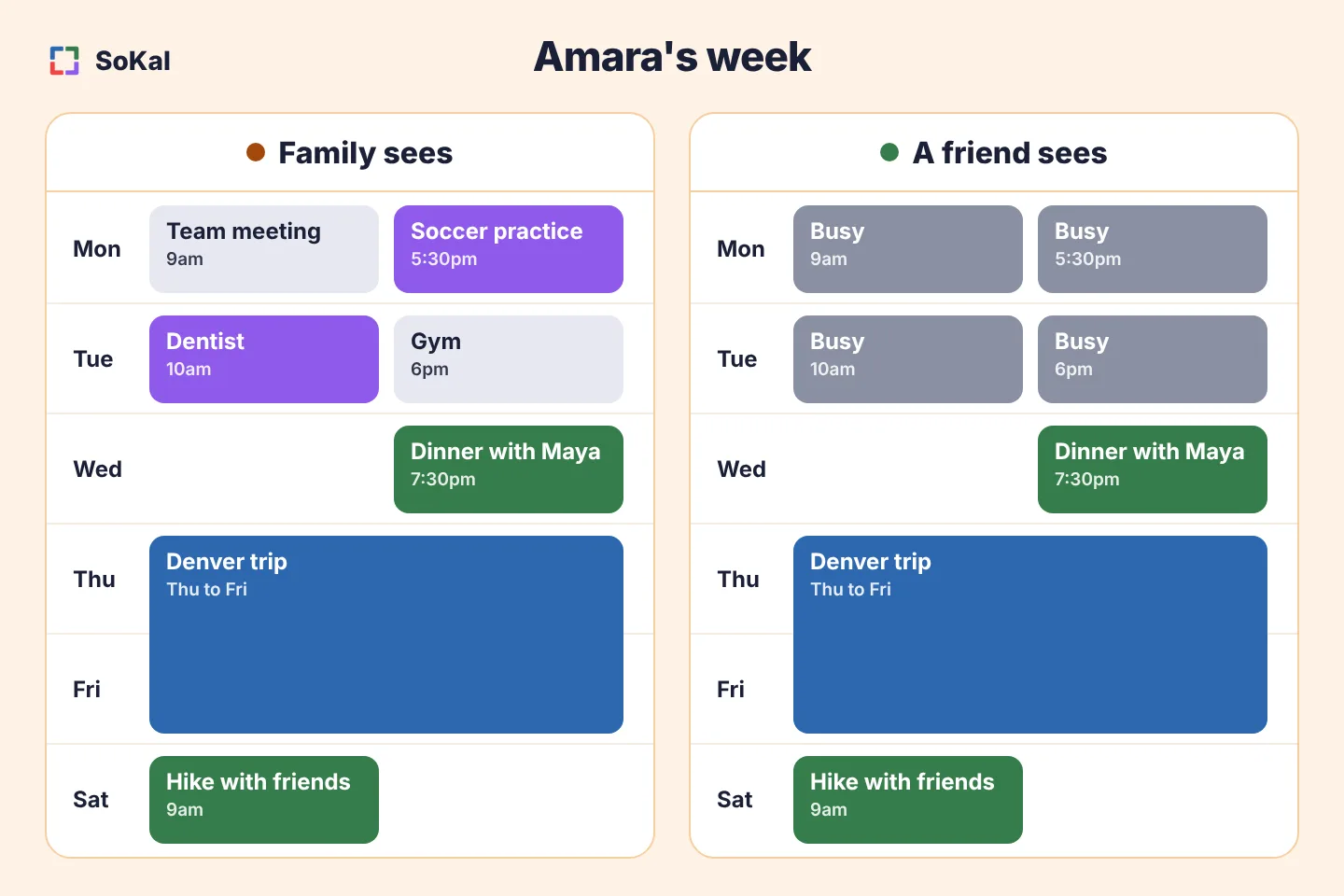
You decide what people see by type of plan. Put your family in a group and let that group see everything: work, workouts, trips, plans with friends. Your friends still see only your outings and trips, and everyone else sees one word, Busy. So your family knows you're in Denver until Friday, and your coworkers and friends don't see the school pickup.
It goes the other way too. You can make your own types, like Kids or School, give them a color, and show them to family only. And if one plan needs to stay quiet, like a surprise party, you can hide that single plan from one person.
Here's where it's weaker. SoKal has no shopping lists, no meal planner and no chore charts. There are no child profiles either. An account needs you to be 13 or older (16 in the EU), so younger kids' activities go on a parent's calendar. If your household runs on lists, Cozi or FamilyWall will do more for you.
Key features
- Two-way sync with Google Calendar, Outlook and Apple Calendar
- Family can see every type of plan while friends see only outings and trips
- Your own event types, like Kids, shown only to the people you pick
- Everything you don't share shows as Busy
- See who's free across the family before you pick a date
Pros
- No second calendar to keep up
- Family, friends and everyone else each see a different amount
- Works across iPhone and Android, and on a laptop
- No ads and no paid plans
Cons
- No shopping lists, meal planner or chores
- No profiles for kids under 13
- Each person needs their own account
- Platforms
- iPhone, iPad, Android, Mac, Windows (Microsoft Store), Web
- Pricing
- Free. The SoKal calendar app has no ads and no paid plans.
More on how this looks day to day: SoKal as a family calendar.
2. Cozi: the family logistics hub
Best for: a family with kids, where the calendar is only half the problem.
- iPhone available
- iPad available
- Android available
- Mac (browser only) not available
- Windows (browser only) not available
- Web available
Cozi has been the default family organizer for years. Next to the color-coded calendar it has shared shopping lists, to-do lists and a recipe box. In a house with school-age kids, the lists often get used more than the calendar.
It's built around one household. The whole family shares one account, and each person signs in with their own email and the shared family password. Everyone sees everything, which is right for pickups and wrong for anything you'd rather keep to yourself. You can subscribe to your work or school calendar so it shows up in Cozi, but then the whole family sees that too.
Check the free version before you build a routine on it. It has ads, and you can only add or see events up to 30 days ahead. Cozi Gold removes the ads and adds the month view on mobile, calendar search, reminders and change notifications.
Pros
- Handles the whole household, not just the calendar
- Simple enough that the whole family will use it
- Works on phones, iPad and in a browser
Cons
- Ads on the free version, which also stops at 30 days ahead
- No privacy inside the family
- A separate calendar from the one you use for work and friends
- Platforms
- iPhone, iPad, Android, Web
- Pricing
- Free with ads. Cozi Gold is $39 a year on cozi.com (November 2026).
3. FamilyWall: the all-in-one family space
Best for: families who want the calendar, lists, messages and a locator in one app.
- iPhone available
- iPad available
- Android available
- Mac (browser only) not available
- Windows (browser only) not available
- Web available
FamilyWall packs a lot into the free version: a color-coded shared calendar, shopping lists, task lists you can assign to a family member, recipes, family messaging, a photo gallery and a list of important contacts. Lists can be private or shared, which most family apps don't offer.
The paid plan is where the calendar connects to the rest of your life. Syncing with Google and Outlook calendars is a Premium feature, and so is subscribing to a school or team calendar by its link. Premium also adds the meal planner, a budget tracker, shared documents and the family locator.
Pros
- A lot of household tools in the free version
- Private lists as well as shared ones
- Phones, tablets and any browser
Cons
- Google and Outlook calendar sync needs Premium
- The meal planner and locator need Premium too
- A separate calendar from the one you use for work and friends
- Platforms
- iPhone, iPad, Android, Web
- Pricing
- Free. FamilyWall Premium is $7.99 a month or $44.99 a year on the US App Store (November 2026), after a 30-day free trial.
4. TimeTree: a shared calendar with a conversation in it
Best for: families who want the back and forth to stay on the event.
- iPhone available
- iPad not available
- Android available
- Mac (browser only) not available
- Windows (browser only) not available
- Web available
TimeTree puts a chat on every event, so "what time?" and "who's driving?" sit with the plan and don't scroll away in a group chat. You can also keep several shared calendars in one account, for example one for the household and one for the grandparents.
That gets you part of the way to a life outside the family calendar: your running club can have its own calendar next to the family one. But each calendar is still all or nothing. Everyone in it sees everything on it, and an event lives in the calendar you put it in.
The free version shows ads, and Premium removes them. There's no iPad or Mac app, so on a tablet or a laptop you use the web version.
Pros
- The discussion lives on the event
- Separate calendars for separate groups
- Works in a browser as well as on phones
Cons
- Ads on the free version
- No iPad or Mac app
- Everyone in a calendar sees everything on it
- Platforms
- iPhone, Android, Web
- Pricing
- Free with ads. TimeTree Premium is $4.49 a month or $44.99 a year on the US App Store (November 2026).
I compared the two in more detail in SoKal vs TimeTree.
5. FamCal: a simple shared family calendar
Best for: a family that wants a calendar, lists and memos without much setup.
- iPhone available
- iPad available
- Android available
- Mac (browser only) not available
- Windows (browser only) not available
- Web available
FamCal gives each family member a color on one shared calendar. Around it are shared grocery and task lists, memos with photos and comments, birthdays and anniversaries, a recipe box and a tracker for trip expenses. Lists can be public, private or shared with only some family members.
Like Cozi, the whole family shares one account. Each person signs in with their own email and the shared password. Some features need a paid subscription, which is sold weekly or yearly.
Pros
- Quick to set up and easy to read
- Lists, memos and recipes next to the calendar
- iPhone, iPad, Android and a web version
Cons
- One shared password for the whole family
- A separate calendar from the one you use for work and friends
- Some features need a subscription
- Platforms
- iPhone, iPad, Android, Web
- Pricing
- Free to download, with weekly and yearly subscriptions for extra features.
6. Apple Calendar: the easiest setup if everyone is on Apple
Best for: households where every device is an Apple device.
- iPhone available
- iPad available
- Android (no app) not available
- Mac available
- Windows (iCloud for Windows) available
- Web (via iCloud.com) available
Set up Family Sharing for up to six people and a shared Family calendar shows up on everyone's iPhone, iPad and Mac. Nobody installs anything. It sits next to your own calendars in the same app, so your work and personal events are one tap away from the family ones.
The limits are Android and privacy. There's no Apple Calendar app for Android, so one Android phone in the family breaks it. And sharing is by whole calendar: your family sees the Family calendar and nothing from your others, unless you share those in full as well.
Pros
- Already on every Apple device
- The fastest setup on this list
- No ads
Cons
- No Android app
- Sharing is all or nothing per calendar
- You still file each event into the right calendar by hand
- Platforms
- iPhone, iPad, Mac, Windows (iCloud for Windows), Web (via iCloud.com)
- Pricing
- Free with an Apple device.
7. Google Calendar: the one your family already has
Best for: families where everyone already has a Google account.
- iPhone available
- iPad available
- Android available
- Mac (browser only) not available
- Windows (browser only) not available
- Web available
When you create a family group on Google, a calendar called Family is made for you. Everyone in the family group can see it, add events and change them. It shows up next to each person's own calendars, and it works the same on iPhone and Android.
As with Apple, the family sees the Family calendar and not your others. To show them your real week you have to share your personal calendar too, and that shares all of it. We went through the options in how to share a Google Calendar.
Pros
- Almost everyone has an account already
- Works across iPhone and Android
- No ads in the calendar
Cons
- Sharing is per calendar
- No lists or meal planning
- No Mac or Windows app, only the browser
- Platforms
- iPhone, iPad, Android, Web
- Pricing
- Free with a Google account.
Which one should you pick?
- Young kids and a lot of logistics. Cozi, or FamilyWall if you want more in the free version. The lists are what keep a family app in use.
- Everyone is on Apple. Apple Calendar with Family Sharing.
- You plan by talking it through. TimeTree, for the chat on each event.
- Working parents, teenagers or grown kids. SoKal. Everyone keeps their own calendar, family sees the real picture, and friends and coworkers see only what you choose.
- A mix of iPhone and Android. Anything here except Apple Calendar.
You can also use two. Plenty of families keep Cozi for the grocery list and a real calendar for everything else.
Sharing with friends as well as family? See the best shared calendar apps.
Common questions
What is the best family calendar app?
It depends on the family. Cozi and FamilyWall are best for a household with young kids, because the shopping lists and to-do lists get used as much as the calendar. Apple Calendar is the easiest if every device is Apple. SoKal is best if you want your family to see your real calendar while friends and coworkers see only what you choose. I built SoKal, so weigh that.
Is there a free family calendar app with no ads?
Yes. Apple Calendar and Google Calendar have no ads, and the SoKal calendar app has no ads and no paid plans. Cozi and TimeTree are free to use but show ads on their free versions.
Can I have a family calendar and still keep some things private?
In most family calendar apps, everything on the family calendar is visible to the whole family, so privacy means keeping a second calendar. In SoKal you choose which types of plans your family sees, and you can hide a single plan from one person.
Do I have to stop using my own calendar?
No. Apple and Google show the Family calendar next to your own calendars. SoKal syncs both ways with Google Calendar, Outlook and Apple Calendar, so your existing calendar stays where it is.
Which family calendar apps work on both iPhone and Android?
Cozi, FamilyWall, TimeTree, FamCal, Google Calendar and SoKal all have apps for both. Apple Calendar has no Android app.
Do kids need their own account?
In Cozi and FamCal the whole family shares one account, so kids sign in to the same one. In SoKal each person has their own account and must be 13 or older (16 in the EU); younger kids' activities go on a parent's calendar.
A family calendar where you still get to be you
SoKal is free. Connect your calendar, add your family, and choose what they see.