
See What Your Friends Are Up To, Right in ChatGPT
What is SoKal in ChatGPT? SoKal is a shared calendar built for friends that you can add to ChatGPT as a custom MCP server. Start a prompt with @SoKal and ask ChatGPT what your friends are up to, what's on your week, or to put a plan on your calendar, at the detail each friend already shares with you. Setup takes a few minutes on the web.
Ask ChatGPT for weekend ideas and you'll get a good list. Ask it which of your friends are free on Saturday and it has nothing to go on. It knows a lot about brunch spots and nothing about your friends' plans.
SoKal is a shared calendar for friends that connects to ChatGPT as a custom MCP server, so you can ask ChatGPT about your friends' plans with @SoKal. Each friend decides what you see of their calendar, and ChatGPT sees exactly that, nothing more.
A quick note: SoKal is our app. I'm James, and I build it. SoKal isn't in ChatGPT's app directory yet, so this guide walks through adding it by hand, step by step, with a screenshot for each.
What can you ask @SoKal in ChatGPT?
You can ask what your friends are doing, what's on your own week, and, with View and edit access, put plans on your calendar. Start every prompt with @SoKal.
What your friends are up to, and what you could join
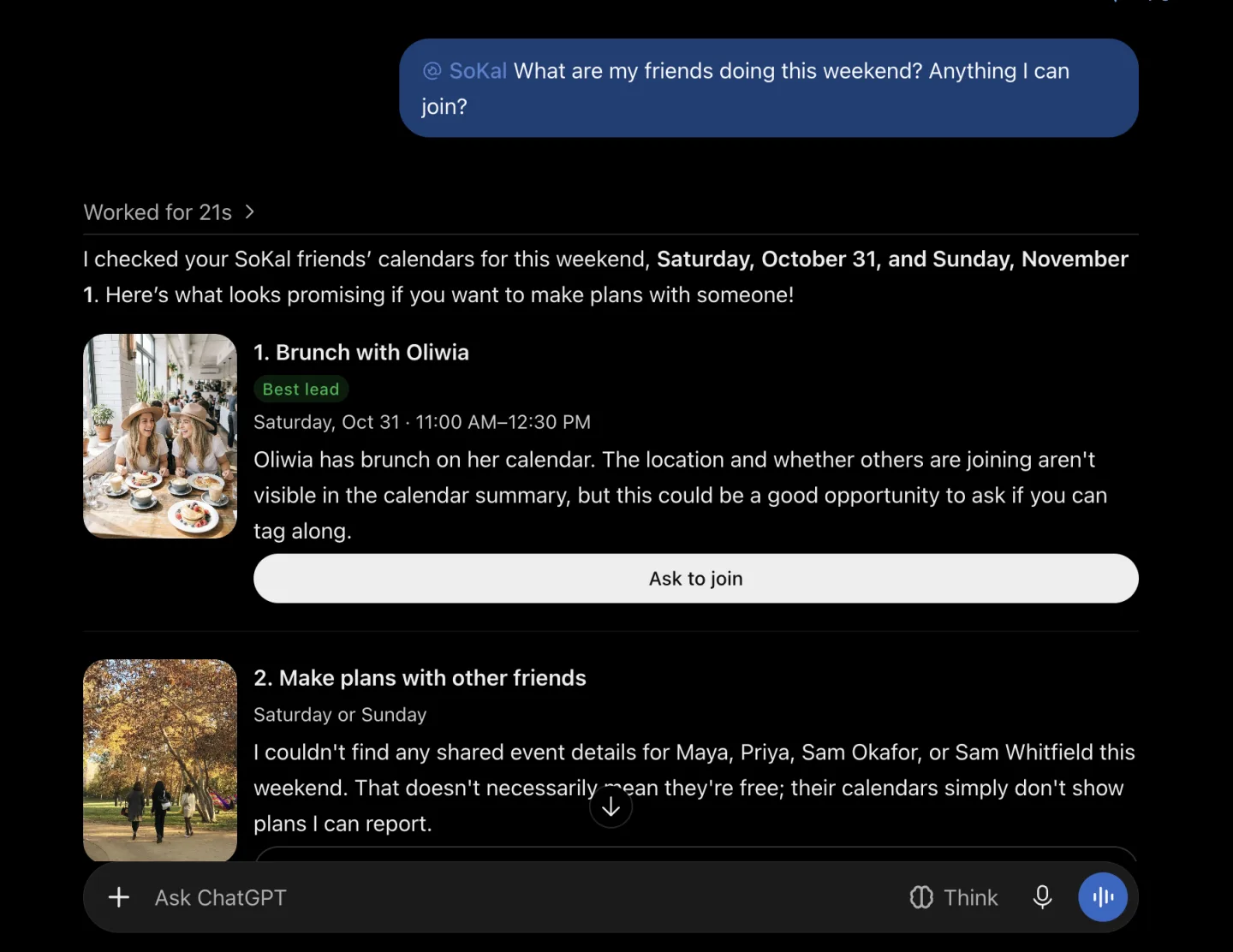
"@SoKal What are my friends doing this weekend? Anything I can join?"
ChatGPT checks your friends' plans through SoKal, at the detail each one shares with you. When we tried it, it found a friend's Saturday brunch, and for the friends whose plans it couldn't see, it said so instead of guessing they were free. That's the point: a friend's private plans stay private, and ChatGPT doesn't pretend otherwise.
Your own week, and new plans on it
"@SoKal What's on my calendar this week?"
"@SoKal Add dinner with Maya on Friday at 7."
ChatGPT lists your own events, including plans you've said yes to and events you synced from Google Calendar or Outlook. With View and edit access it can add and change your own events too. Anything that would tell someone else, like inviting friends or changing a plan other people are on, comes back as a summary first and waits for your yes.
How do I connect ChatGPT to a shared calendar?
Add SoKal to ChatGPT as a custom MCP server, on a computer, with the address
https://mcp.sokal.app/. You need a SoKal account, free in the app or at
sokal.app, and a paid ChatGPT plan: ChatGPT's Free and Go plans
can't add custom MCP servers. We've tested every step below on ChatGPT Plus.
Open Plugins in ChatGPT. On a computer, open ChatGPT on the web and click Plugins in the left sidebar.
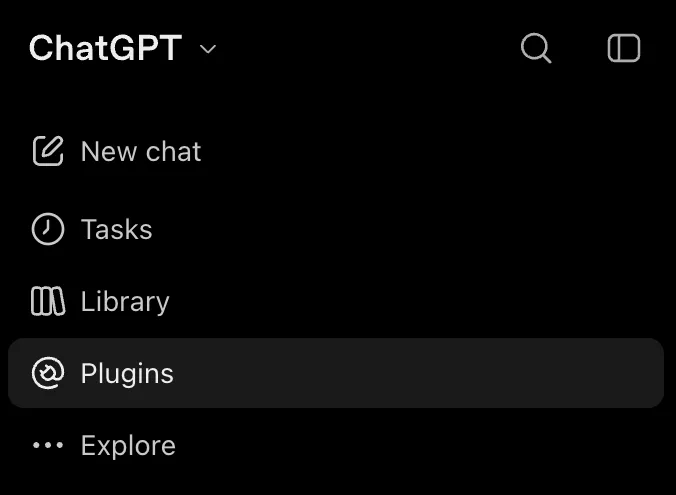
Step 1: Plugins, in the left sidebar. Add a custom MCP server. In the top right, click Add, then Add custom MCP server.
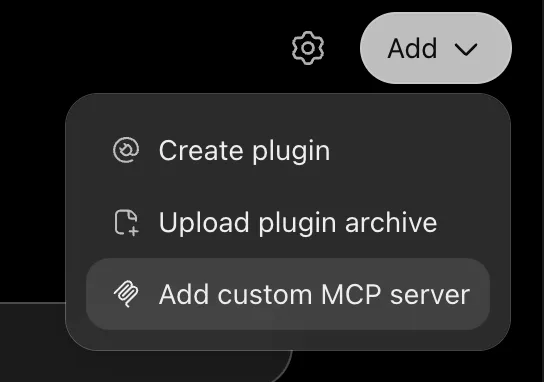
Step 2: Add, then Add custom MCP server. Enter SoKal's details. Name it SoKal and enter https://mcp.sokal.app/ as the server URL. Tick I understand and want to continue, then choose Create as a plugin. You don't need to change anything else.
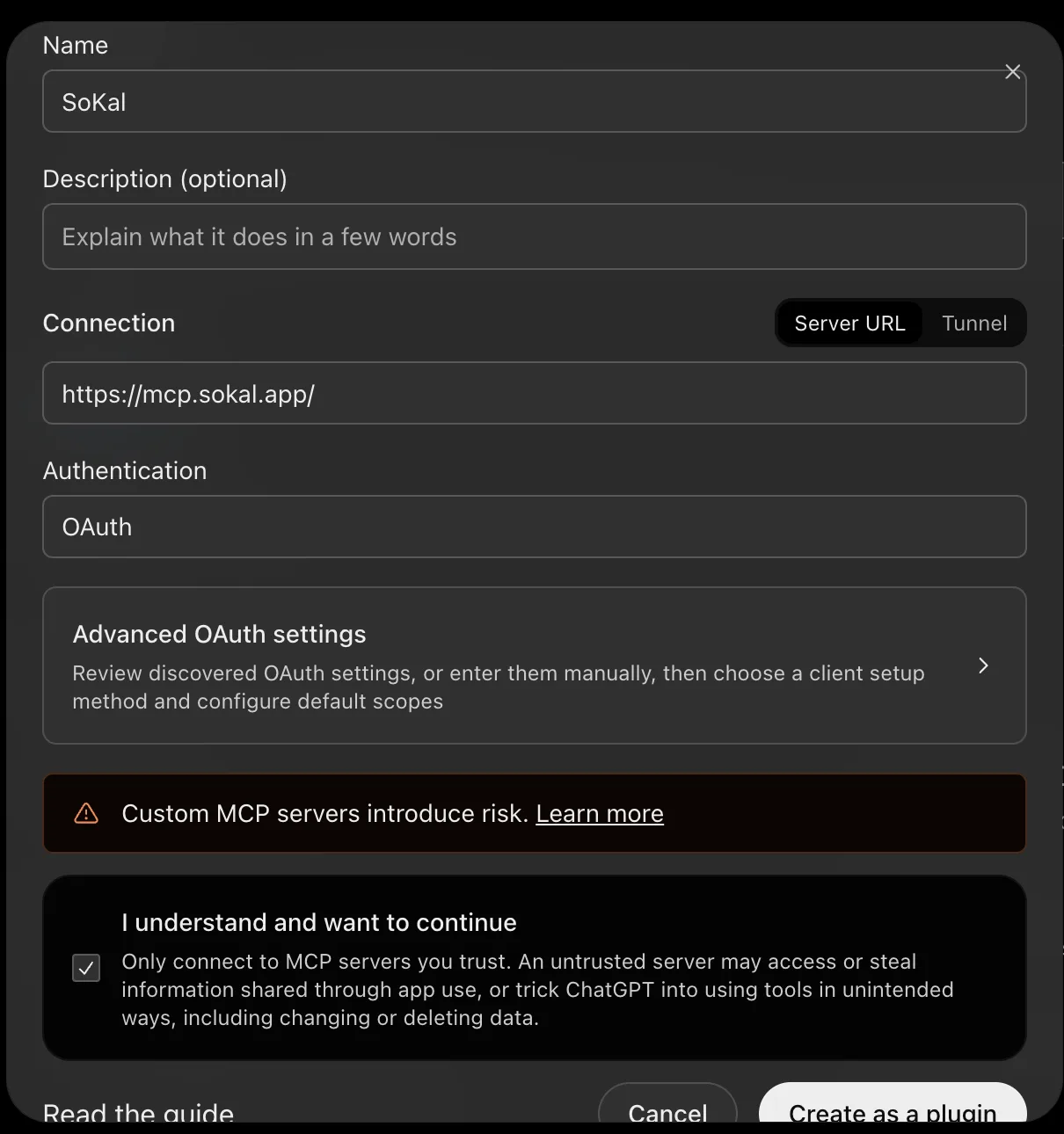
Step 3: the name, the server URL, and the box ticked. Leave everything else as it is. Connect SoKal and sign in. Choose Connect SoKal and sign in to SoKal with your phone number, with Google, or with your email and password. Signed up with Apple? Apple sign-in isn't on this page, so first verify your phone number in the SoKal app (your profile, then Edit profile, then Phone numbers), then sign in here with that number.
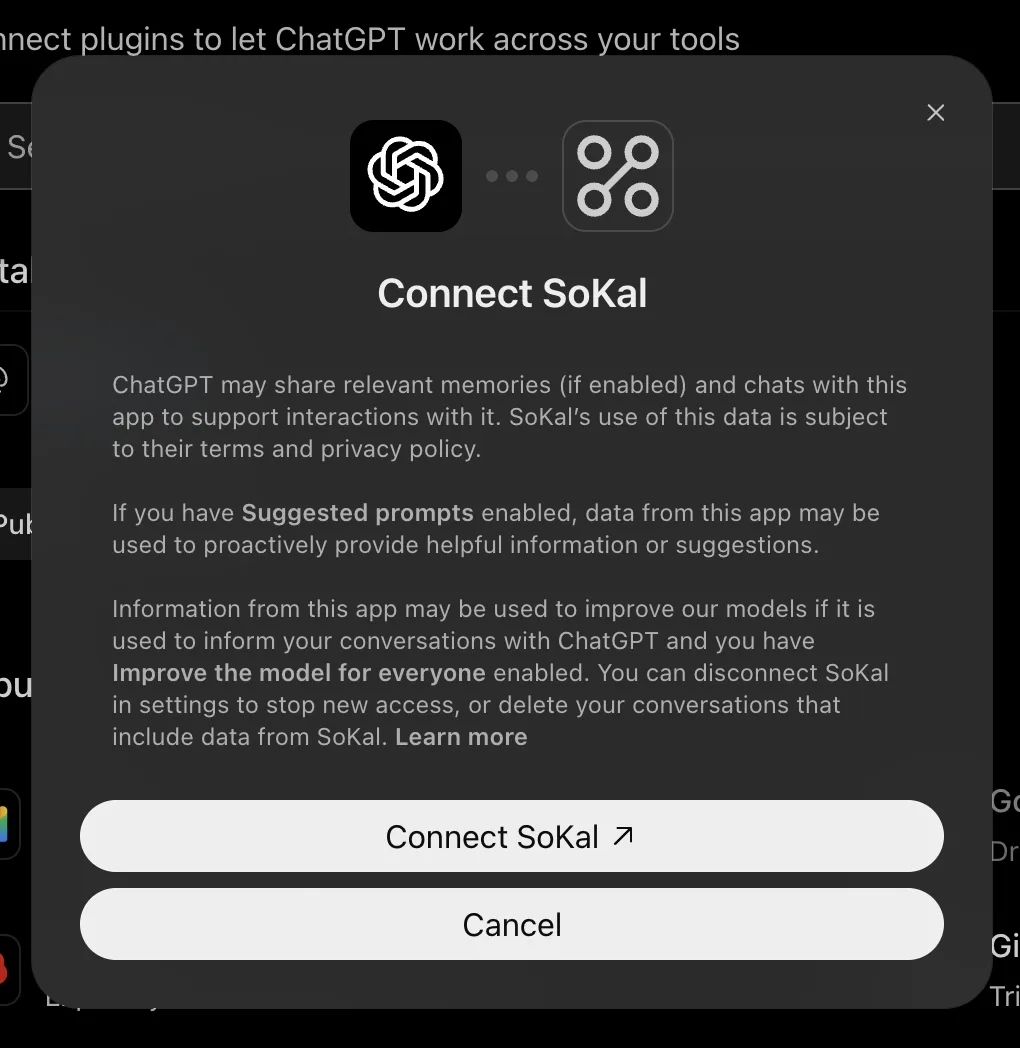
Step 4: Connect SoKal, then sign in to SoKal. Choose View only or View and edit. Pick View and edit to let ChatGPT add and change your own events, or View only, then click Allow.
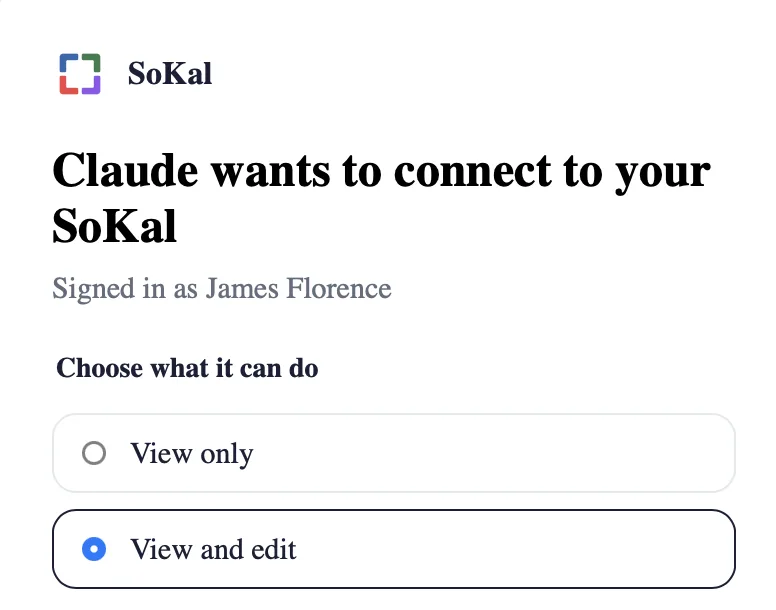
Step 5: the same SoKal screen appears for ChatGPT, with ChatGPT's name at the top. Start your prompt with @SoKal. Ask, for example, "@SoKal What are my friends doing this weekend?"
The same steps, on one page: SoKal for ChatGPT. Something wrong, a wrong answer, or something more you'd like it to do? Email team@sokal.app.
How do I use SoKal in a ChatGPT chat?
Start your prompt with @SoKal. That tells ChatGPT to use your SoKal calendar for that question, so the answer comes from your friends' real plans rather than from ChatGPT's general knowledge. If an answer about your friends sounds generic, check that the prompt starts with @SoKal.
Can ChatGPT see my friends' private plans?
No. Through SoKal, ChatGPT sees each friend's plans at the detail that friend already shares with you, and never more.
- Private stays private. A plan a friend doesn't share with you shows as Busy. Events your friends synced from Google Calendar or Outlook always show as Busy to an assistant, even when that friend shares that kind of plan with you.
- Friends only. ChatGPT can only invite people who are already your friends on SoKal. It can't text phone numbers.
- Two checks before anything changes. SoKal holds anything that would delete an event or tell someone until you approve its summary. OpenAI's own guide says ChatGPT asks you to confirm write actions by default as well.
- You choose the access. View only gives ChatGPT read access. View and edit also lets it change your own events.
- Disconnect any time. In ChatGPT, open Plugins, choose SoKal and disconnect it, or in SoKal on the web open Settings › AI assistants and choose Disconnect next to it, which ends its access straight away.
Our Privacy Policy covers what a connected assistant can see and what we keep.
How is SoKal in ChatGPT different from Claude and Gemini?
The calendar and its rules are the same in all three: the same Busy blocks, the same friends-only invites. What changes is how you add SoKal and how you call it. Our guides to SoKal in Claude and SoKal in Gemini cover those two.
| What differs | ChatGPT | Claude | Gemini |
|---|---|---|---|
| Where you add it | Plugins, then Add custom MCP server, on the web | Claude's connector directory, or by its address | Customize, then Connectors, then Custom apps |
| In the assistant's directory | Not yet | Yes | No, added as a custom app |
| How you use it in a chat | Start the prompt with @SoKal | Just ask, once SoKal is connected | Start with @SoKal, or choose Use now |
| Who can add it | Paid ChatGPT plans (we tested Plus) | Every Claude user; on Team and Enterprise an Owner enables it first | 18 or over, in the US, personal Google Account, Keep Activity on |
Common questions
Which ChatGPT plans can use SoKal?
You need a paid ChatGPT plan: ChatGPT's Free and Go plans can't add custom MCP servers. We've tested SoKal on ChatGPT Plus, reading and changing events. OpenAI decides which plans get custom MCP servers, so if you don't see Add custom MCP server under Plugins, your plan doesn't have it yet.
Is SoKal in ChatGPT's app directory?
Not yet. For now you add it as a custom MCP server, which takes a few steps. Setup becomes one tap once SoKal is in ChatGPT's app directory, and we'll update this guide.
Do I need a computer to set it up?
Yes. Add SoKal in ChatGPT on the web, from Plugins in the left sidebar. OpenAI's own setup guide describes the web.
Why should I start with @SoKal?
Starting your prompt with @SoKal tells ChatGPT to use your SoKal calendar for that question, so the answer comes from your friends' real plans.
Can ChatGPT see my friends' private plans?
No. Through SoKal, ChatGPT sees a friend's plans at the detail that friend already shares with you. Anything else shows as Busy, and your friends' Google Calendar or Outlook events always show as Busy.
Can ChatGPT send invites without asking me?
No. Inviting friends, deleting an event or changing a plan other people are on comes back as a summary first, and nothing happens until you say yes. OpenAI's guide also says ChatGPT asks you to confirm write actions by default. ChatGPT can only invite your SoKal friends, and it never texts phone numbers.
Does OpenAI use my SoKal data to train its models?
SoKal doesn't use your calendar to train AI models. On ChatGPT's side, its Connect dialog says information from an app may be used to improve OpenAI's models if it's used in your conversations and you have Improve the model for everyone turned on. That setting is yours to change in ChatGPT.
How do I disconnect SoKal from ChatGPT?
In ChatGPT, open Plugins, choose SoKal and disconnect it. You can also do it in SoKal on the web: open Settings › AI assistants and choose Disconnect next to it. That ends its access straight away.
I signed up for SoKal with Apple. How do I connect ChatGPT?
The SoKal sign-in page that opens from ChatGPT doesn't offer Apple. Verify your phone number in the SoKal app first: open your profile, tap Edit profile, then Phone numbers. Then connect ChatGPT and sign in with that phone number.
Bring your friends' plans into ChatGPT
SoKal is free. Make your account, add your friends, then add SoKal to ChatGPT.


Setting it up? See SoKal for ChatGPT, or download SoKal for every device.